


The setups that cause problems, and a checklist for running both without guessing.
We turned on a test, and our blended ROAS slid from 3.4 to 3.1 while it ran. Our media buyer says the test is hurting the Facebook algorithm. We paused it, and ROAS came back. Is the media buyer right? We hear some version of that question constantly.
The idea that testing hurts your Meta ads gets repeated until it sounds like settled fact.
It isn't. Taken literally, that story would make any A/B test unsafe to run under live spend, because splitting traffic across variants is the whole definition of a test. If that were true, nobody could test and advertise at the same time. Plenty of Shopify Plus brands do both without issue. What's actually going on is more specific, and it depends entirely on how you set the test up.
One thing up front. We're not media-buying experts. We're A/B testing experts who did the homework on how the two systems actually interact, and what follows is grounded in Meta's own documentation and research.
Where the problem actually shows up
Meta's ad auction doesn't know or care that you're running a test. It reacts to your ad, your destination URL, your audience, and the conversion signal flowing back through your pixel, and nothing else. There's no setting for "this advertiser is A/B testing," and no mechanism that treats a live test differently from any other traffic.
The problem shows up when your two versions look like two different destinations to Meta. Point one ad set at one URL and another ad set at a second URL, and Meta is optimizing two separate things. It delivers each to a different slice of your audience, for reasons that have nothing to do with which page converts better. The gap you measure is then part page and part audience, and you can't tell which is which. It can look like a clean result when it's mostly an artifact of who saw what.
This is the sharpest version of the skeptic's case. When your test cells differ in ways the platform can see, the delivery algorithm sends each one to a different audience, and the difference you measure mixes the change you made with the audience the algorithm picked. Researchers call this divergent delivery. Meta scientists and their academic co-authors measured it across 181,890 A/B tests on the platform and found it nearly everywhere, with 22% of the audience differences they measured crossing the threshold researchers treat as meaningful. It shrank as they matched cells on objective, audience, budget, and bid strategy, and cleared only in a handful of tests where those matched and delivery was capped at roughly one impression per user (Burtch et al., 2025).
Three tests in the dataset met that strictest bar, and the authors say plainly that no configuration removes divergent delivery entirely. Read it as a direction, not a law. One detail matters if you run conversion campaigns: imbalance was worst under conversion objectives and mildest under awareness, because lower-funnel optimization is what pushes delivery toward different audiences in the first place. A peer-reviewed study in the Journal of Marketing documents the same phenomenon and argues it's harder to escape than this (Braun and Schwartz, 2025). Citations at the end.
A same-URL on-site test sidesteps that problem by construction. The visitor clicks your one ad, lands on the URL they always land on, and gets served either your original or a variant behind the scenes. Meta sees one ad pointing at one destination, delivers it to one optimized audience, and the split happens after the click, at random, on your side. There is only one delivery for the algorithm to skew, and both variants draw from it equally. That's why the comparison holds. Worth being precise about what that rests on. The research above studies tests run inside Meta, where the cells are ad configurations. It doesn't examine on-site testing at all. What it establishes is the mechanism: delivery diverges when cells differ in ways the platform can see. A same-URL on-site test gives it nothing to diverge on. That's a structural argument rather than a measured result, and it's the stronger one.The strongest academic critique of ad experiments is the reason same-URL testing is the trustworthy way to do this, not a reason to avoid it.
"Delivery diverges when the platform can see a difference between your cells. A same-URL test gives it nothing to see."
A same-URL test has one limit. It tells you which page converts the traffic you're getting right now, not the incremental dollar impact of your advertising. That's a different question with a different tool, and we come back to it later.
One more effect, and it's symmetric. If your variant converts worse than your original during a test, the blended conversion rate Meta sees dips, its estimated action rate ticks down, and your CPM ticks up. That is the pattern behind the opening story. Part of the ROAS slide is this effect, and part is the normal week-to-week noise any campaign shows. Pausing the test pulls the lower-converting variant out, the blended rate climbs back, and the number recovers, which is why it looks like the test caused all of it. It didn't, and the part it did cause is symmetric. It hits both arms equally, so the comparison between original and variant stays valid even while the absolute numbers in your ad account move around.
The flicker connection
A testing tool that slows your site or flashes the wrong version before the right one loads is arguably a bigger worry than anything happening in your ad account. Client-side and redirect-heavy tools can flash the original page for a moment before the variant takes over. That flash is a bad visitor experience, and it drags down the page-experience signals platforms react to. Google and Meta handle that differently.
Google is explicit. Landing page experience is a documented input to Quality Score and Ad Rank, so a slow or janky page raises your effective cost per click directly, by Google's own rules.
Meta is more indirect. It doesn't publish a page-experience score the way Google does. A flickering, slow page lowers your conversion rate and raises your bounce, and that weaker conversion signal is what Meta's delivery reacts to. The result over time is similar, higher CPMs and CPCs, but the path runs through your conversion rate, not a Meta page-quality score. The distinction matters, because a sharp media buyer will check it.
Template and theme tests do redirect. Shopify renders the correct version at the same URL using a query parameter, the way its template system works natively. That redirect is fast, but it's there. It's why Shoplift runs an anti-flicker component. When a test is live, Shoplift extends its base testing script to hold page content until all elements have fully loaded, then shows the correct version, which prevents the flicker or blink effect common with A/B testing platforms. Within that fraction of a second, Shoplift places the visitor into the audience segment that matches the test and keeps them on that variant for the rest of the test. The script is lightweight and runs only on actively tested pages, so the impact on the rest of your store stays near zero. For the specifics, see the anti-flicker component doc on docs.shoplift.ai.
JS API and price tests work differently. No redirect at all, just content swapped in place on the page you're already on. That's why those test types load fastest end to end.
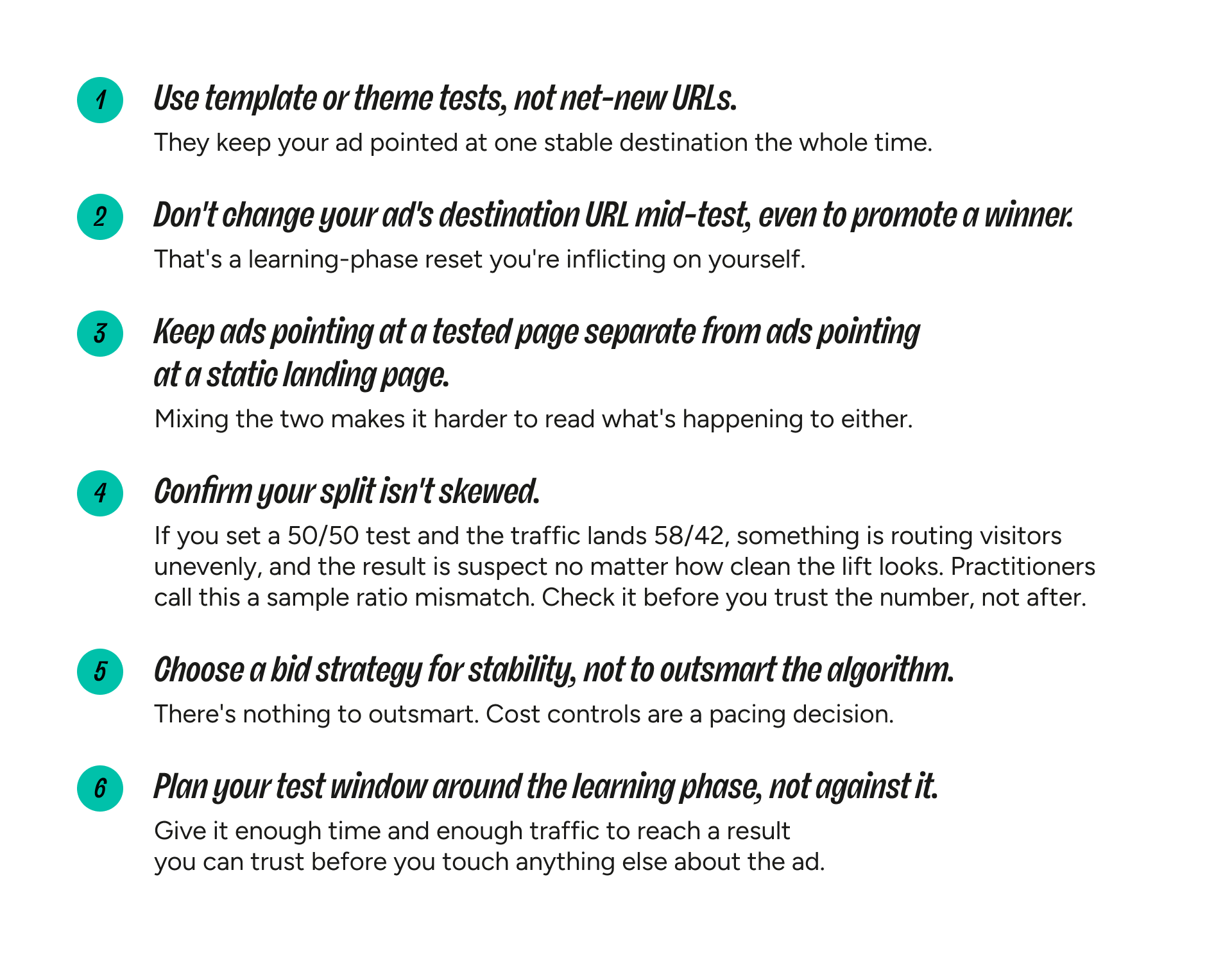
A setup checklist
The mechanics, channel by channel
Meta
Meta's learning phase, where an ad set re-optimizes delivery, needs roughly 50 optimization events per ad set per week to exit. It resets when you make a meaningful change to the destination URL, creative, audience, or bid strategy, and when you move budget hard (the media-buyer rule of thumb is more than a 20% budget shift inside 72 hours, though creative and URL changes reset it regardless of size). A same-URL test touches none of those, so nothing resets.
Bid strategy is the one setting to choose on purpose. Cost cap and bid cap trade some spend volatility for a steadier CPA day to day, useful if you're running a lot of tests and want predictable pacing. That's a stability choice, not a way around Meta's auction. For most accounts, default bidding works fine during a test.
Meta has a policy against non-functional landing pages, occasionally enforced on tests that don't deserve it. Keeping your visible URL stable and matching your creative to what both variants show is the best insurance against a false flag, and appealing quickly resolves most of them.
None of this touches attribution. Shoplift doesn't modify UTM parameters or click IDs. Whatever tracking arrived with the click stays intact regardless of which variant the visitor lands on.
Google's version runs through Quality Score and landing page experience. A slower or less relevant-feeling variant can ding your Quality Score, which raises your effective cost per click. Smart Bidding has its own adjustment window, typically three to five days, separate from anything on your site. Google's policy is stricter about redirects than same-page changes, another reason to keep the visible URL stable.
Common mistakes and how to spot them
"My ad got disapproved the moment the test went live." Rare, and usually tied to a redirect-based setup or a creative-to-landing-page mismatch, not to testing itself. Confirm your ad still points at a stable URL and that your creative's promise matches what both variants show.
"My campaign keeps re-entering the learning phase." Check what actually changed. It's almost always a URL, creative, audience, or budget edit made during the test window, not the test itself.
When the test result and the ROAS report disagree
If your on-site result says one thing and your ad account's ROAS says another, trust contribution profit over channel-level ROAS.
The ad account is the less reliable of the two. Blended ROAS in Ads Manager is built on modeled and windowed conversions, and since iOS signal loss, a growing share of it is estimated rather than observed. It reacts to CVR and CPM movement that has nothing to do with which variant made you more money, through a lens that's already fuzzy.
Revenue per visitor is the more reliable read, because it accounts for conversion rate and order value in one number measured on your own site. Use RPV as the working scoreboard, and know its edges. RPV counts the sale, not the return, and not the margin. A variant can lift RPV while lifting returns or tilting the basket toward lower-margin SKUs. When the stakes are high, grade the winner on contribution profit net of returns.
If the question is whether your advertising drove incremental revenue, neither RPV nor ROAS answers it cleanly. That's what an incrementality test or geo holdout is for, and it sits above both. You don't need one for every page test, but it's the tool that answers the dollars question, so don't ask RPV to prove something it can't.
After you ship the winner: the post-rollout reality check
Most testing advice skips this. Your on-site result is a hypothesis about what happens at 100% of traffic, not a guarantee. Sometimes a test shows a clean win, you roll it out, and the numbers go flat or worse. Three things usually explain that, in roughly this order.
Most often, the test was underpowered or called early. The win was partly noise, and it regresses toward a smaller, true effect once it's running on all your traffic instead of half of it. The fix is discipline before you start. Decide the smallest lift worth detecting, size the test for it, and run to a horizon you set in advance instead of stopping the moment the line looks good. Calling a test the first time it crosses significance is how you manufacture wins that don't survive rollout. Kohavi, Tang, and Xu's work on trustworthy online experiments is the standard reference.
Less often, it's a composition effect. During the test, your ad account optimized against a blended signal made of both variants. At full rollout there's no blend left, and if the winner performs differently across segments, the aggregate can look different than the 50% slice you tested on.
Rarest, and only if you ran a split-URL test, is an actual re-learning event on the ad platform. Promoting a winner there means moving to a new canonical URL. Same-URL tests avoid that entirely, since there's no new URL to promote to.
If Meta's pixel already fired on your variant during the test, why would rollout change anything on the ad-platform side? Mostly it doesn't. That's why the first two explanations, not the ad platform, are the usual culprits. Rollout disappointment is usually a measurement problem wearing an ad-platform costume.
Treat your on-site result as a number you confirm, not a number you bank.
"Treat your on-site result as a number you confirm, not a number you bank."
Watch CPM, CPA, and ROAS at the channel level for a week or two after you roll out a winner, alongside your on-site CVR and RPV. If the lift held and nothing else moved, log it and move to the next test. That's the whole game, a dozen confirmed one and two percent lifts stacked over a year, not one hero test. If something else moved, the true result is the combination of both, and that's the number that counts.
The bigger picture: you don't have a testing problem, you have a program problem
Step back and every friction point in this piece rhymes. Rollout surprises you because nothing tracked whether your last winner held at the business level. Ad costs blindside you because your on-site results and your ad metrics live in separate tabs nobody reconciles. You can't tell whether a win will hold because tests get called on significance instead of power, and nothing enforces the discipline.
None of that is a single-test problem. It's what a pile of tests looks like when there's no program underneath. The fix is to treat testing as a continuous program with memory, where every result is logged, every winner gets confirmed after rollout, and the compounding ledger of small lifts is the scoreboard you manage against. RPV is that scoreboard. Your ad account is the referee. You want both before you bank a win. The reader nodding along to the ad problems above isn't missing a better test. They're feeling the absence of a program.
"RPV is the scoreboard. Your ad account is the referee. You want both before you bank a win."
What Shoplift does under the hood
Shoplift assigns visitors to a variant client-side, with no server call, unless you're using geo-targeting. Because assignment is random, the split can drift slightly from 50/50 over time. A background process checks for that drift and rebalances it without adding a server call to your page load. That rebalancing is your first line of defense against the skewed-split problem above, keeping traffic close to the ratio you set so the comparison stays clean.
Template and theme tests redirect within the same URL, using a query parameter to tell Shopify which version to render. URL tests redirect to a different page, for when that's what you want to compare. JS API and price tests swap content in place with no redirect. UTMs and click IDs pass through untouched in every case. If a page carries heavy paid traffic and you want no redirect at all, a JS API test is the one option with none. That's a practical note, not a sign that template or theme tests aren't safe for paid traffic. They're built for exactly that case.
For the full technical breakdown, see the companion FAQ doc on docs.shoplift.ai.
TL;DR
Same-URL on-site tests don't give Meta anything new to react to. They also avoid the pattern that produces the bias serious researchers warn about, since there's one ad, one destination, and one delivered audience feeding both variants. The setups that cause friction are the ones that change what Meta or Google can see: a new destination URL, a separate ad set per variant, or a mid-test edit to your ad configuration.
Keep your ad pointed at one stable URL, let Shoplift manage the split underneath it, confirm the split isn't skewed, and judge your test on RPV rather than raw ROAS. Grade the winner on contribution profit when the stakes are high, and reach for an incrementality test when the question is about incremental ad dollars. Then check your ad metrics after rollout and confirm the lift held before you log it. That's the whole setup.
FAQ
Will running A/B tests hurt my Meta ads algorithm?
Not if it's a same-URL on-site test. The setups that genuinely interact poorly with Meta, split-URL tests, mid-test ad changes, and running variants as separate ad sets, are all avoidable.
Does Shoplift affect my ad attribution?
No. UTMs and click IDs stay intact regardless of which variant a visitor sees.
My ROAS moved after I launched a test. Is that the test?
Possibly, but not because Meta is punishing you. A lower-converting variant can nudge CPM up slightly through a symmetric, blended effect. Your test comparison still holds.
Should I use cost cap, bid cap, or my default bidding during a test?
Whatever you'd normally use is fine. Cost controls matter only if you specifically want steadier day-to-day spend pacing during a high-velocity testing period.
Does an on-site win mean my ads made more money?
Not on its own. An on-site test tells you which page converts your current traffic better. Whether your advertising drove incremental revenue is a separate question, and an incrementality or geo-holdout test is what answers it.
My test showed a clear winner, but rollout went flat. What happened?
Most likely an underpowered or early-called test, or a composition effect from going to 100% of traffic. Size the test in advance and run it to a set horizon to avoid the first one. Watch your ad metrics for a week or two after rollout to confirm the win held before you log it.
Subscribe to the Shoplift newsletter
Get insights like these emailed to you bi-weekly!
{{hubspot-form}}


