


A merchant we work with recently moved from universal free shipping to a $75 threshold. The plan was scoped as a settings change: update the shipping rate in Shopify admin, launch the test, read the results. By the time the variant was actually ready to launch, the team had rewritten the announcement bar, the cart progress message, a shipping callout on every PDP, two abandoned-cart email triggers, and the shipping policy page. One number had quietly embedded itself across the entire storefront, and changing it meant changing everything that referenced it.
That gap between how the test was scoped and what it took to build is often underestimated by customers we speak with. A free shipping threshold test looks like a one-line change because the rate itself lives in one place. Since this is a common and important test for many of our customers, we gathered all the surfaces the threshold touches, the order of operations that keeps the test clean, and what to measure when revenue, AOV, and contribution margin point in different directions.
This guide is for two readers. The first is the merchandising or growth team scoping a threshold change and discovering it's bigger than it looked. The second is the finance-aware operator who suspects free shipping is over-indexed, and wants the test that settles it.
Every surface the threshold lives on
The fastest way to scope a free shipping threshold test is to walk the shopper's journey from first impression to post-purchase inbox, and write down every place the threshold appears or is implied. The inventory clusters into five groups.
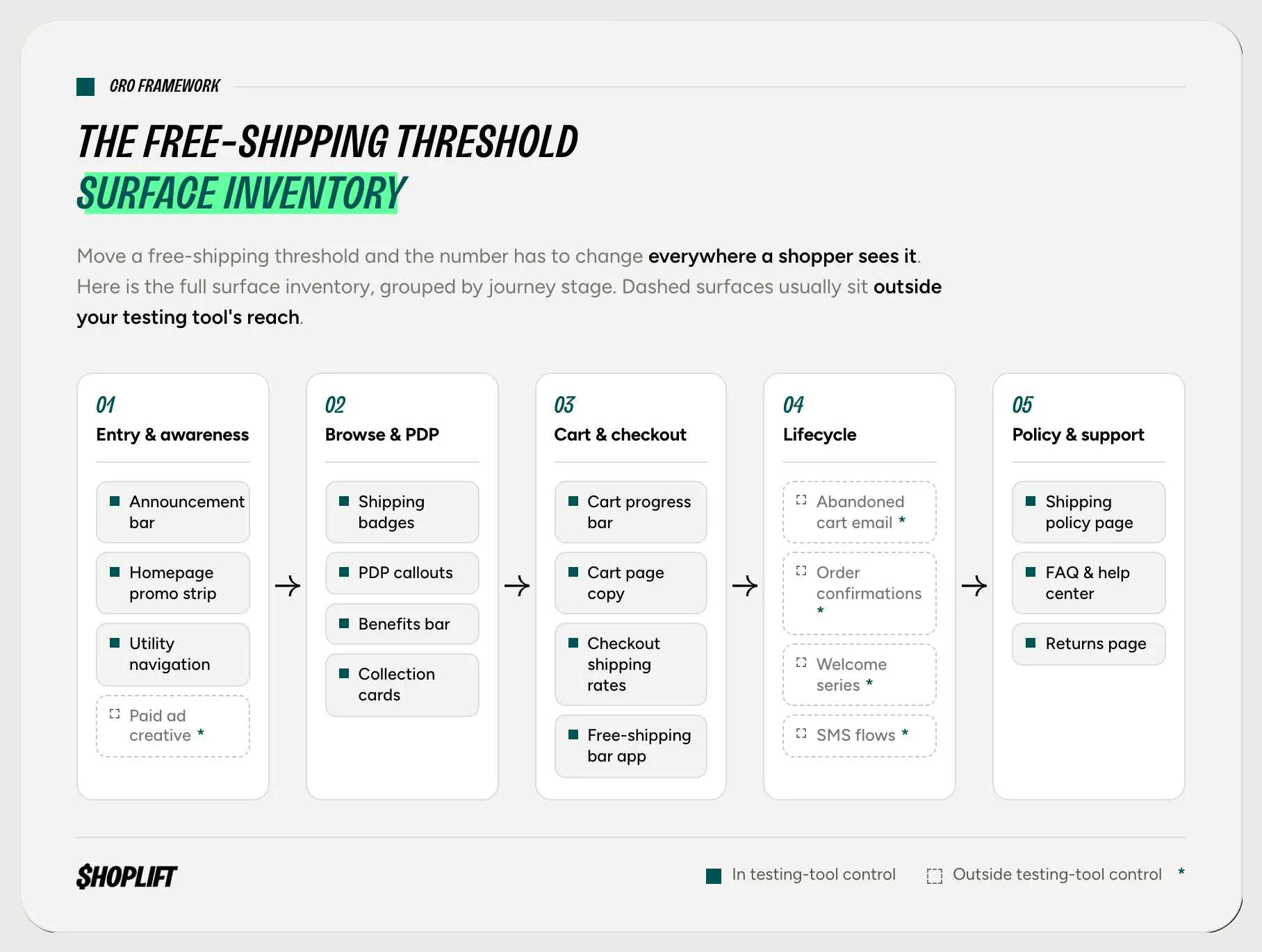
Entry and awareness. The announcement bar is usually the first place the threshold appears, often in the first second of the session. Homepage promo strips and utility navigation sometimes repeat it. Paid ad creative frequently does too, and this one deserves a flag early: ads live outside your testing tool's control, which matters for how you handle them (more on that in the next section).
Browse and product pages. Shipping messaging shows up on PDPs more often than teams remember. Shipping badges near price, "free shipping over $X" lines in accordions, and shipping mentions inside a benefits bar below the add-to-cart button all carry the number. Collection page product cards and sticky add-to-cart bars sometimes repeat it. Each one is a surface the variant has to update.
Cart and checkout. This group does the heaviest behavioral lifting. The cart progress bar ("you're $12 away from free shipping") is the component that converts a threshold from a policy into an AOV mechanic; if any single surface justifies the test, it's this one. Beyond it: cart page copy, the checkout's shipping method labels, the actual rate configuration in Shopify shipping settings, and any third-party free-shipping-bar app, which holds its own copy of the number in its own settings.
Post-purchase and lifecycle. Order confirmations and shipping notification emails sometimes restate the policy. Abandoned-cart email and SMS flows frequently lead with it ("don't forget, free shipping on orders over $50"). Welcome series, popups, and loyalty messaging often promise it. These are easy to forget precisely because they fire days after the session your testing tool is watching.
Policy and support. The shipping policy page, the FAQ or help center, and the returns page. Low traffic, but a shopper who checks the policy page mid-test and finds a number that contradicts the cart is a shopper you've confused, and confusion is the one variable you never want in a variant.
Most brands find somewhere between eight and fifteen surfaces on this walk. The count matters less than the completeness: a single stale surface showing the old number is enough to muddy what the test is measuring.
The order of operations that keeps the test clean
There are two common failure modes that ruin shipping tests. The first is internal incoherence: the variant shows $75 in the cart and $50 in the welcome email, so the variant isn't testing a new threshold in this case; it's testing conflicting information. The second is leakage: surfaces the testing tool can't split (email automations, transactional messages, ads) show the same number to both arms, contaminating the comparison. The sequence below exists to catch both before launch.
First, inventory. Run the journey walk above and list every surface. Assign each one an owner, because announcement bars, email flows, and checkout settings rarely belong to the same person.
Second, classify. Mark each surface as controllable (your testing tool can show different versions to each arm) or global (everyone sees the same thing regardless of arm). On-site components are usually controllable in a shipping A/B test on Shopify; email flows, SMS, transactional notifications, and ad creative usually aren't. Checkout shipping rates are a special case: they're controllable, but only if the visitor's test assignment is passed into checkout itself, typically as a cart attribute that checkout logic can read when returning a rate.
Third, build the variant coherently. Every controllable surface in the variant gets the new number. No exceptions, no "we'll update the FAQ later." The variant should read as if the new threshold had always been the policy.
Fourth, decide on the global surfaces. You have two honest options. Pause or genericize them for the test window (an abandoned-cart email that says "complete your order" instead of quoting a threshold works for both arms), or leave them running and log them as a known contaminant when you read results. What you can't do is ignore them, because a control-arm shopper receiving a variant-threshold email isn't in a controlled experiment anymore.
Fifth, QA as a shopper. Walk the full journey in both arms before launch: land, browse, add to cart, abandon, return, check out. You're hunting for stale numbers, and they hide in the surfaces nobody owns.
Sixth, lock the primary metric. Decide what wins the test before the test starts. This is the step teams skip, and it's the one the final section of this post is about.
Free shipping is over-indexed more often than teams assume
There's a reason free shipping became the default posture. Baymard Institute's research on cart abandonment finds that once you set aside shoppers who were only browsing, the most common fixable reason for abandoning a cart is extra costs being too high (shipping, taxes, and fees), cited by 39% of US online shoppers. Nothing else on the list comes close; slow delivery, the next reason down, sits at 21%.
So free shipping works, and that's exactly the problem. Because it removes the single biggest solvable source of checkout friction, teams adopt it as a conversion lever and stop treating its cost as a margin decision. Every free-shipped order absorbs the carrier cost directly from contribution margin, and that absorption never shows up in a conversion dashboard.
A brand running shipping-charge tests saw this firsthand. They expected shipping charges to be a conversion tax worth measuring; instead, margin per checkout improved when shipping was charged. The orders they lost were costing more in absorbed shipping than they were contributing in profit. The result surprised the team precisely because no one had been measuring shipping as a cost center. Free shipping had been graded for years on the metric it flatters (conversion) and never on the one it quietly drains.
The takeaway is not "charge for shipping." Plenty of brands run threshold tests and confirm that free shipping at the right level is worth every absorbed dollar. The key point is that a free shipping threshold test is essentially a margin test disguised as a conversion test, and it should be evaluated accordingly.
What to measure when the metrics disagree
Shipping tests reliably split their metrics, and the split follows a pattern. Conversion rate tends to favor the lower threshold or universal free shipping, because friction is lowest. AOV tends to favor the higher threshold, because the cart progress bar pulls shoppers toward a bigger number. Contribution margin can swing either way, depending on how much shipping cost each arm absorbs and how order economics shift. After the test, whichever metric you check first will offer you a flattering story, and the other two will offer a different one.
The discipline is to choose the primary metric before launch, and for a shipping test, the strongest candidate is contribution margin per visitor. Revenue per visitor nets conversion against AOV, which makes it better than either alone, but it still treats a free-shipped order and a shipping-paid order of the same size as identical. They aren't. Shipping cost is the variable the test is moving, so the honest scoreboard has to include it. Contribution margin per visitor (revenue minus COGS, absorbed shipping, and fulfillment, divided by visitors in the arm) is what changes when the threshold changes.
Conversion and AOV don't disappear; they get demoted to diagnostics. They tell you why margin moved, which arm of the trade-off did the work, and whether the higher threshold lifted carts or just suppressed orders. Add return rate as a guardrail, since shoppers padding carts to clear a threshold sometimes send the padding back, and a margin win that evaporates in returns wasn't a win. If you've ever had a test reach significance on one metric while another flashed red, this is the same problem in concentrated form, and the same answer applies: a pre-committed primary plus guardrails beats a post-hoc story every time.
One operational note: contribution margin per visitor requires per-order cost data (COGS, actual shipping paid, fulfillment) joined to test arms. Brands that haven't wired this up before the test end up reconstructing it afterward in a spreadsheet, which is doable but slow. Set it up before launch.
Test it as a system, read it on margin
Scoped honestly, a free shipping threshold test is a coordinated change across a dozen surfaces, measured by the metric of how the threshold moves. That's more work than the one-line change it gets mistaken for, but it's also the difference between testing a threshold and testing a mess.
Shoplift supports shipping threshold tests natively on Shopify, and the setup is built around the hardest surface on the inventory: checkout.
A JS API test assigns each visitor to a variant; the assignment is stored as a cart attribute so it persists through to checkout, and a Shopify Function reads that attribute and returns the matching shipping rate. Each shopper sees her arm's rate at the moment it counts, which closes the leakage problem this post has been warning about. Fair warning: this is one of the more technical tests you can run, and we recommend working closely with your developers (or on our Pro plan) before launch, which is fitting for a change that was never as simple as it looked.
If free shipping is the biggest number on your P&L nobody has ever tested, start a free trial and scope it against the inventory above.
FAQ
What is a free shipping threshold test?
A free shipping threshold test is an A/B test that compares two shipping offers, such as universal free shipping versus free shipping over $75, by splitting traffic between them and measuring the impact on conversion, average order value, and contribution margin. Because the threshold appears across many site components (announcement bars, cart messages, PDP callouts, emails), the test variant has to update all of them together, not just the shipping rate setting.
What surfaces need to change when I test a new free shipping threshold?
Typically eight to fifteen surfaces: the announcement bar, homepage promos, PDP shipping callouts and benefits bars, collection page badges, the cart progress bar, cart and checkout copy, Shopify shipping rate settings, any free-shipping-bar app, abandoned-cart email and SMS flows, welcome series, order confirmation emails, and the shipping policy and FAQ pages. The exact list varies by store, which is why a journey walk-through is the first scoping step.
How do I run a shipping A/B test on Shopify without breaking the experience?
Inventory every surface that displays the threshold, classify each as controllable by your testing tool or global, update every controllable surface coherently in the variant, and pause or genericize the global ones (like email automations) so they don't contradict either arm. For checkout, the visitor's test assignment needs to persist into checkout itself, typically stored as a cart attribute that a Shopify Function reads to return the correct shipping rate. Then QA the full shopper journey in both arms before launch.
Should I measure a free shipping test on conversion rate or contribution margin?
Contribution margin per visitor is the stronger primary metric, because shipping cost is the variable the test is moving and conversion rate ignores it. Conversion rate and AOV remain useful as diagnostics that explain why margin moved. Pre-commit to the primary metric before launch to avoid picking whichever number flatters the result afterward.
Why did my margin improve when I started charging for shipping?
Free shipping absorbs the carrier cost on every order, which comes directly out of contribution margin. If the orders gained by offering free shipping contribute less profit than the shipping cost absorbed across all orders, charging for shipping (or raising the threshold) improves margin per checkout even when conversion dips. This is common enough that shipping tests should always be read on margin, not conversion alone.
What is contribution margin in a CRO test?
Contribution margin in CRO is revenue minus variable costs (cost of goods, absorbed shipping, fulfillment, and payment fees), measured per order or per visitor in each test arm. It answers whether a test made the business more profitable rather than just busier. For tests that change cost structure, like shipping or pricing tests, it's usually the most honest primary metric.
What if AOV goes up but conversion goes down in my shipping test?
This is the expected pattern for a higher threshold: the cart progress bar pulls order values up while the added friction suppresses some orders. Neither metric settles the question on its own. Compute revenue per visitor to net the two effects, then contribution margin per visitor to account for the shipping cost each arm absorbed. The trade is worth it only if margin per visitor improves.
Can I test free shipping if my email and ad messaging can't be split by my testing tool?
Yes, but handle the uncontrollable surfaces deliberately. Either pause threshold-specific automations for the test window, rewrite them to be threshold-neutral ("complete your order" instead of quoting a number), or document them as a known contaminant when reading results. Ignoring them means control-arm shoppers receive variant messaging, which weakens the comparison.
How long should I run a free shipping threshold test?
Long enough to reach statistical significance on your primary metric across at least one full business cycle, typically two to four weeks for most Shopify stores. Margin-based metrics often need more volume than conversion metrics because per-order profit varies widely. Avoid running the test across major promotions, since discount-driven carts behave differently around thresholds.
Is free shipping over-indexed?
Often, yes. Free shipping earns its default status because extra costs are the top fixable reason shoppers abandon carts (39% per Baymard Institute), but most brands have never measured what absorbing shipping costs them in contribution margin. The honest answer for any individual brand comes from a threshold test measured on margin per visitor, not from the category default.
Subscribe to the Shoplift newsletter
Get insights like these emailed to you bi-weekly!
{{hubspot-form}}


